Travel plans,
in your pocket
Flights, stays, tickets and the plans in between. Keep the details together in a day-by-day itinerary, ready wherever you go.
What you can do.
Your trip, day by day.
From your first flight to your last dinner reservation, keep your travel plans in one place. See where you’re staying, what you’re doing and what’s next.
Different time zones.
Keep flight details close, with take-off and landing times shown in each airport’s local time. Know when you leave and when you arrive.
Less copying. More planning.
Turn confirmation text into trip details without entering everything by hand. Share it to RelicPack, translate it if it’s in another language, and add it to your itinerary.
Tickets ready. Even offline.
No connection at the gate? Keep tickets and booking documents attached to your plans, ready to open offline.
Premium for your own tripsSee the bigger picture.
Switch from the day’s details to the whole trip. See the busy days, spot the gaps and filter by the types of bookings you want to see. You can also publish a trip to a calendar of your choice; that part is still being tested.
Pack. Tick. Go.
Keep track of what’s packed and what’s still on your list. Adapt the built-in packing list or make a checklist for your trip.
Plans become memories.
The best parts aren’t always on the itinerary. Capture the day’s discoveries and detours in a travel diary of your own. It’s never included when you send your itinerary, but it’s in your Markdown backup, and you can pass an entry on to Orbari or Restauranteer.
Know what you spent. And who paid.
Keep a clear record of booking costs for the two of you. Note who paid for each booking, with totals kept separate by currency.
Every stop, on the map.
Split a trip into legs, such as Tokyo, Hakone and Kyoto. Each gets its own pin and dates, so the whole route makes sense at a glance.
Bring your own AI assistant.
On a Mac, let an assistant such as Claude read your trips, or add to them. It’s off until you turn it on, asks for Touch ID, and can never edit or delete anything.
Built · in testingAdd the flight home.
Browse the sample Japan trip, then choose Add a flight to try the form.
Japan in spring
12–20 Sep 2026
Times are local to each place.
Flight number and date. Add other details later.
Built for iPhone,
iPad and Mac.
Ready for iOS 27 and macOS 27
At home on your Mac.
Plan at your desk, with a sidebar for moving between trips and room for the whole itinerary.
- Keyboard shortcuts, menus and undo
- Quick Look for tickets and PDFs
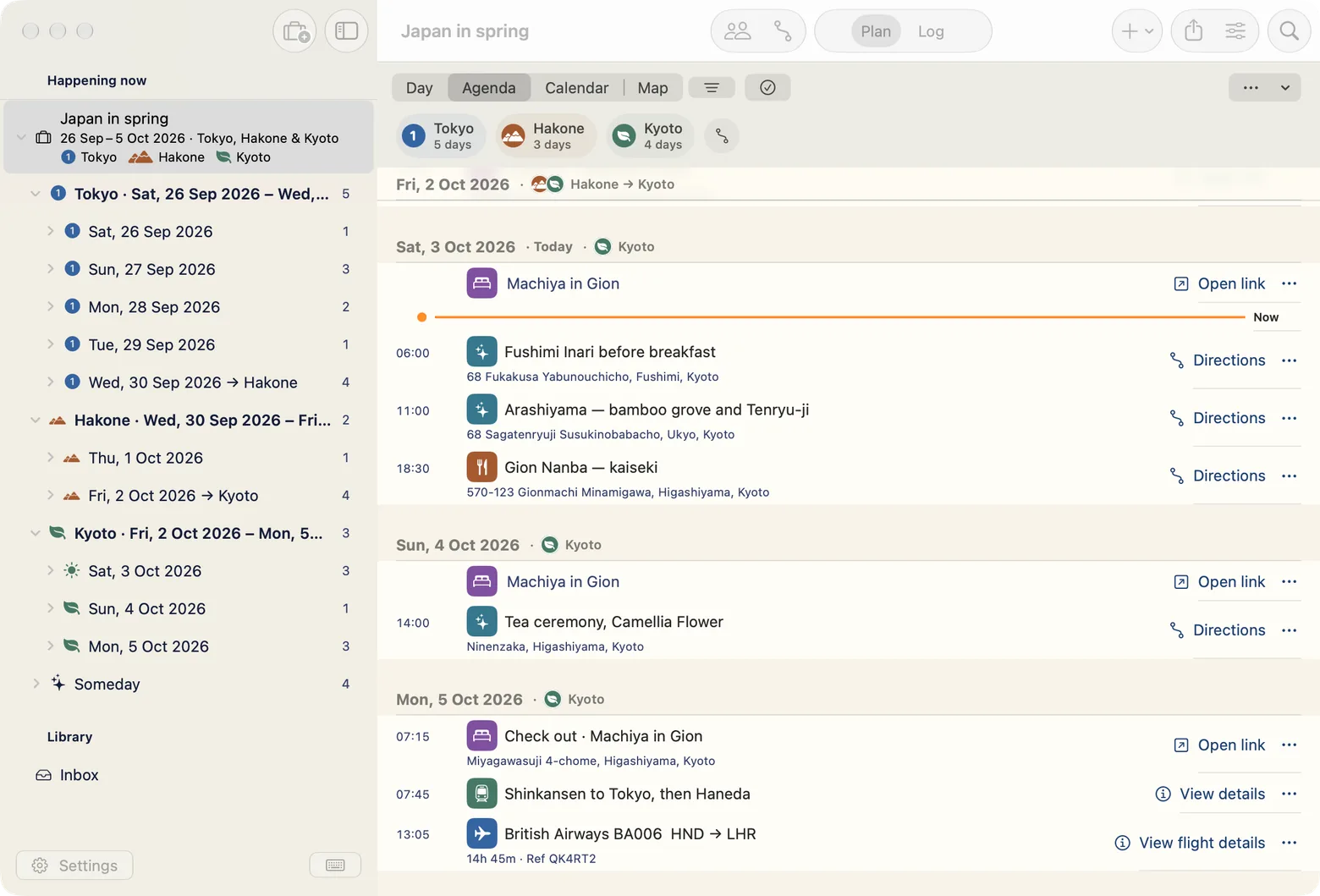
RelicPack on Mac · Development build, sample trip
Keep control of your trips.
No account.
No analytics in the app.
Your trips stay on your device and in your own iCloud.
Read the privacy details--- id: '5a3d9e10-c0de-4a11-9e5a-000000000001' schema_version: 1 type: item kind: flight start_day: '2026-09-12' start_time: '09:35' start_zone: Australia/Melbourne end_day: '2026-09-12' end_time: '19:00' end_zone: Asia/Tokyo confirmation: QK4RT2 carrier: Qantas code: QF79 from: MEL to: NRT departure_terminal: '2' departure_gate: '11' seats: '31A, 31B' cost_amount_minor: 246000 cost_currency: AUD paid_by: Sam attachments: - boarding-pass.pdf created_at: '2025-08-24T01:46:41.000Z' modified_at: '2025-08-24T01:46:41.000Z' --- Window seats together. Bags checked through to Tokyo. Fare covers both of us, both ways.
Every trip, as plain Markdown.
Mirror your trips and their attachments to iCloud Drive or any folder you choose. Export-only, Obsidian-friendly: one folder per trip, one file per booking, and the originals beside them. Open a file above to see one.
Exports and backups are never behind a paywall.
More about exportsPay once. Coming soon
Share the planning.
Free
No trip limit$0Start planning
- Unlimited trips and all planning tools
- iCloud sync, exports and backups
- Join and edit a partner's trip, including adding attachments
Premium
Pay onceUS$7.99Planned launch price · No subscription
Everything in Free, plus:
- Start shared trips
- Attach PDFs and images to your own trips
- Save videos and posts as cards with thumbnails
- Google place search, no API key needed
Only the person starting a shared trip needs Premium. Local prices will appear in the App Store. Sync, sharing and Google place search are still in testing.
The beta is on its way.
RelicPack is in development for iPhone, iPad and Mac. Sign up for the beta announcement and occasional release news.
Get beta updates ↓